Showing posts with label Tabs. Show all posts

15 March 2021

Ring Mechanism Tabs

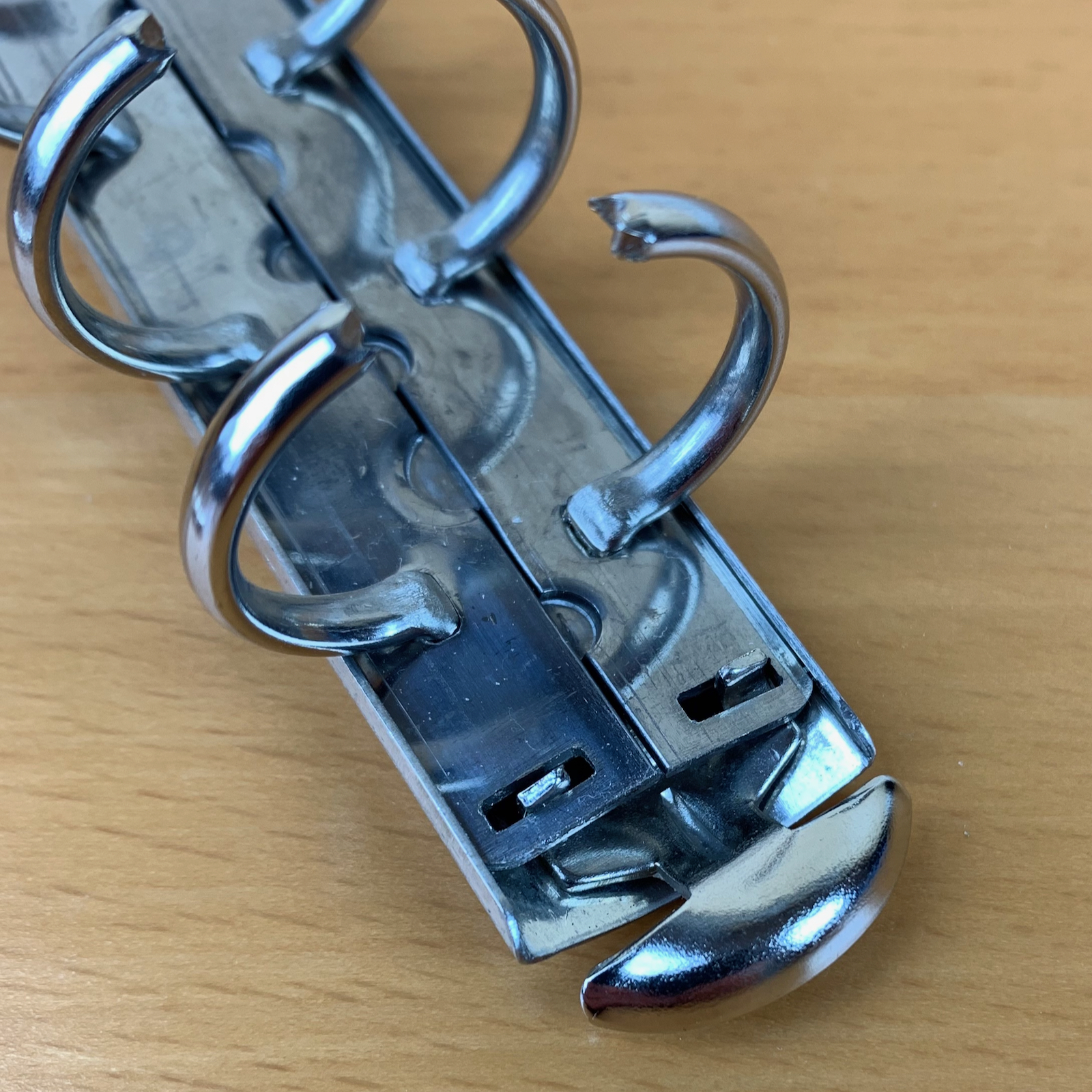
The tabs on the ring mechanism are those parts at the each end of the mechanism that you push down on to open the rings. 

Here is a ring mechanism with the top cover removed to show the inner details of the mechanism. The top cover actually holds the tabs in place as well as making the mechanism look more attractive to look at! Without the top cover in place the tabs might fall out when the rings are open. 


If we zoom in now on one of the tabs. The two lugs on each of the tabs go through the rectangular holes in the ring base plates (The plates that the rings are attached to). In the closed position you will notice little or no movement in the tabs. 


When you push down on the tabs, this results in a small upward movement at the opposite end of the tab. That upward movement pushes the ring plates up and the rings open. In the open position you should find that the tabs are quite loose. 


Here are the tabs themselves. The two outer lugs are the ones you see in the photos above and the larger central lug is the bit that pushes upwards when you press down on the tabs to open the rings. 


You can't close the rings by using the tabs, only open them. However, sometimes when you close the rings with your fingers a tab can get partially stuck and that can then hold the rings slightly open, causing gaps in the rings. 

If you see this, lift the two tabs upwards to see if that solves the problem. In addition check that the top cover hasn't moved, as that can impede the movement of the tabs or the rings themselves. 

A simple check is to open and close the rings a few times and see if that frees things up a bit. 

I have been asked in the past if the ring mechanism needs any lubrication. The only thing this will do will be to prevent parts from rusting, generally the parts aren't under any stress and the movement is so small that lubrication will not normally be necessary. However, a small 'squirt' of WD40 or similar will not do any harm, just don't over do it and make sure you wipe off any excess with a paper towel otherwise it might stain the leather/fabric covering of the organiser. 

On ring mechanisms that can be taken apart like the ones above, I usually apply a small amount of vaseline to assist in reassembling the rings, but again I'm careful to wipe off any excess before reattaching the ring mechanism to organiser back plate. 

As always if you have any problems with ring mechanisms that you haven't been able to solve yourself please feel free to contact me. 

21 January 2013

Tabs/Sections

What Tabs or Sections you divide your Filofax or organiser up in to are frequent questions I see on Philofaxy and elsewhere.

Some time ago I discovered a document about organising a paper planner as if you were starting from nothing. It was written by David Allen of Getting Things Done fame.

David Allen free PDF ORGANIZING A PAPER PLANNER is available on his website.

He recommends for Getting Things Done:
    • Notes/In... is a trusted place to freely capture input as it occurs, without having to analyse or organize it. It is the first section, because it can come into play instantly, anywhere.

    • The next most frequently accessed information will be the actions you need or want to take at any time. They are best organized in three sections (and most likely viewed in this order):

    • Calendar... is the first place you’ll look to know what has to be handled today, and how much time you’ll have otherwise to deal with all the other things you have to do, which you’ll see on your Action Lists.

    • Actions Lists... which let you know all the single actions and next steps on your projects, to be done as soon as you can get to them.

    • Agendas... hold all the reminders for items to discuss with people and in meetings.

    • When you are in control of all of the above, you will next want to connect and update all your actions by reviewing:

    • Projects/Goals... which will remind you of the final outcomes you want to accomplish. For some of these, you will want more detailed...

    • Project Plans/Notes... which will ensure greater comfort that you have all the right action steps needed to move things forward effectively.

    I adapted the above to my own requirements and I went with:
    • Notes In - Basically the same function as recommended above.

    • Planner - This is my Enhanced TM Week per View for all my future and daily planning requirements.

    • Journal - For this I use my Week on per View Journal insert which records all or most of the things I have been doing in the last day or so throughout the year. I don't keep all 12 months of this insert in the organiser though.

    • To-Do - I use these sheets for long term goals, so I have a 'House' sheet, 'Personal' sheet etc, on those I just list the headings and some details of things I hope to get done in the coming year.

    • Notes - Stuff I jot down for projects, Philofaxy posts, random websites to record them somewhere before I file them some where more appropriate.

    • Information - This is where I store my maps and reference information.

    • Address A-Z- All of my contact sheets printed off from the Filofax Address Book Software which I've been using successfully this last couple of years.

    Whilst most Filofax organisers come with pre-named tabbed dividers (Diary, Notes, Projects, Information, Financial and Addresses) are these the right titles and are they in the order you should have?

    01 July 2012

    Nan's 2012 Midyear Setup - Personal

    In addition to the A5 I use for work, I have a Personal-size Filofax that I use as my wallet and daily planner.

    This is the organizer that's by my right hand when I'm sitting at home or at work, and comes with my in hand, handbag, or gym bag every time I leave the house.

    I started 2012 using the red Finsbury I've used most of the time since I bought it in 2006, carrying over the page setup I used 2011: DPP Diary; followed by a few leaves for FLYlady routines, task reminders, projects, financial, and notes behind a tabbed transparent flyleaf; and Slimline A-Z tabs for contacts and a few pages of lists and reference information.

    Notice how I keep saying "a few."With the DPP, you don't have room for a full set of 6 tab dividers plus a set of A-Z tabs.

    By March 2012, I was ready for a couple of changes. I was yearning to use my warm brown Finchley, which I haven't taken out for about 3 years.

    Also, I was growing tired of having a jumble of things behind that one tabbed flyleaf. I was referring to the pages back there more than to what was on the DPP.

    So I switched back to my brown Finchley, with Wo2P cotton cream paper and the following tabs:
    • To-Do - Lists of things to do without a due date, with one page per category: Calls, Web, Errands, Home, etc. 
    • Flight Plans - Daily to-do list, based on FLYlady chores.  
    • Projects - One yellow ruled page per project. A project could be something like Christmas shopping, cleaning up garden, etc. 
    • Notes
    • Financial 
    • A-Z Index - Contacts, shopping lists, directions, etc. 
    This setup worked fine, and I really enjoyed the cotton cream paper, but I missed the extra space on the DPP. So I went back to the DPP and the Slimline tabs. My daily flight plan fits just fine in the right column on the DPP—no flipping back and forth! In the left column, I have room not only for appointments but their accompanying information...address, things to bring, money spent on the road (which is mainly what I was using the Financial section for). 

    I'm loving the DPP setup in my new Ink Cuban. I use it for my wallet, too: the cash goes in the mesh pocket in back. It's the only thing I need to take when I leave the house. Behind the diary, I have a few white ruled pages and jot pad pages for ideas and reminders, since there are no tabbed sections. But most of the time, since I have the whole year in DPP, I can write everything right on the day where it belongs. 

    So where will my longer-term projects go? That's the subject of my next post. 

    28 May 2012

    Simple and flexible dividers

    <Puts hand up> OK, I admit that things in my Malden are a bit of a mess.
    There is some sort of order, but I haven't been using any dividers as I haven't yet got round to making my own. When I put A4 sheets of paper into my filofax, I fold them over so that the punched holes aren't covered. This means they're slightly wider than A5 which means the standard size dividers get hidden. I'm aware I could add in another fold, but it just seems more fiddly to me. Initially my idea was just to make the dividers all wider, but realised they would probably get in the way of my pen instead. Then I came across these little magnetic page markers, which seemed to be just perfect and I set to work with the following, using the blue piece of card as a cutting template:


    I'm really pleased with the results as I wasn't particularly inspired by cardstock at my local shops, and it's been a cheap and easy way to introduce more colour.


    I chopped up the rest of the calendar for when I fancy a change.


    Another added bonus is that I can use the plastic sleeve the bookmarks came in. I'm not sure if I'll use it for pens as they'll be a bit bulky, but I love finding new uses for items especially when it's just going to be thrown away.


    I think the only possible downside to the page markers is the additional weight they'll add. However, as my filo stays at home it's not an issue for me personally. The reviews I've read say that the markers are good at staying put on a page, so hopefully they'll work well as dividers for me.

    And this is what the front of my filo looks like currently with my new tabs showing clearly.


    11 December 2011

    A-Z tabs

    The humble A-Z tabs... we have come to think of them as just for sorting our names and addresses or our contacts. In a recent FFAF people freely admitted that they don't keep their contacts in their Filofax.

    I was surprised by this, but I can see some people's reasoning for relying more and more on their phone which hopefully they have backed up on their PC or in the 'Cloud'

    So some other ideas on how you could use the A-Z tabs which I'm sure you have still.

    I use my 'Internet Site Info' sheets for recording Site, Username, Password details on and these are stored within my A-Z tabs based on the Site name.

    I don't record the full password. As I use several similar passwords I might only record things like O.......79 the number of dots does not however match the number of letters. So anyone finding my Filofax would not have access to any of my passwords.

    I tend to use similar letter patterns but just change the upper and lower case elements, so another site using the same phrase as above might be recorded as o.....U79, it just serves as a reminder to me.

    When I was learning to use the command line version of the Linux Operating System. I had a series of note pages within my A-Z tabs to record the details of various commands and how I specifically needed to use them on my computer.

    In my old job I was always being tripped up by abbreviations, military people have an annoying habit (to me that is!) of reusing abbreviations in common use, but for something completely different. Reading their reports was becoming a total headache trying to find what they met by NEC or TCM etc So I started another A-Z index of abbreviations to be able to look them up faster.

    Our Philofaxy community has grown considerably in the past year or so, I'm thinking of using the A-Z tabs to create a 'User Index' so I can cross reference Comment Names vs Twitter Names vs Real Life Names... my poor grey matter tends to be a little forgetful at times when it comes to names!

    If you use a Filofax to store recipes you could use the tabs to divide up the recipes by name or type.

    Or if you keep your own personal reviews of books then may be use the A-Z to separate our your reviews by Author name.

    I'm sure you can think of some more uses besides the ones I've outlined.

    02 December 2011

    Sliding Tabs

    This idea came to me in one of those flashes of inspiration, a sort of why didn't I think of that before...

    So the problem... Franklin Covey tabbed pages are much wider than Filofax ones... so much wider that they stick out of the side of a Filofax organiser.. See Zoe's blog post that shows this problem better than I can describe it....

    So the FC Tab picture is just that a standard dimension FC tab with the holes where they are when you buy them.... and yes they stick out.


    I then put a Filofax Tab on top of it and located the holes where they would be on the page. Used a single hole punch on the FF holes and then with a craft knife cut out the card between each hole to form the slots. 


    In the binder pulled out you can see the tab.... pushed in it disappears flush with the excess in the space inside the rings. I've tried it on my Malden and it seems to work....


    Just a slight variation with the mark 2 version. Just a simply single cut between the two rows of holes. You can still move them in or out with a little effort. But these might be easier to make and you don't lose too much of the space on the tab.

    I will admit my mock up tabs aren't exactly beautifully made, but I just wanted to show you the idea...

    Now the only problem I can see is if there is anything printed on the tab divider? It might look a bit messy/odd with the oval slots in?


    10 August 2011

    Making Your Filofax Your Own - Dividers

    You might have bought a Malden or a Finsbury or a Domino, and externally they look just the same to someone else’s similar Filofax organiser. However, open your Filofax and that is where the differences start to tell.

    You can change the contents of your Filofax to suit your needs and demands in organising your life.

    Whilst you can buy dividers or your Filofax might have come with a set of dividers or tabs. A lot of people make their own. They can really make the inside of your Filofax colourful and very different.

    So today I'm going to give you links to some of the posts we have highlighted in the past:
    These are just a few examples to give you some ideas. But you could also use post cards or old greetings cards or birthday cards trimmed to size and punched to use as dividers. 

    16 March 2011

    Behind your tabs: chronological order or priority first?

    While pondering the nearly-infinite flexibility of Filofax, I thought of different ways to set up my pages behind my tabbed dividers.

    Normally I arrange pages behind my tabbed dividers in order of priority. When I turn my tabbed page, the first page I see is the highest priority in that section. Subsequent pages are in order of decreasing priority. This works for my lists, my reference information, my personal goals section, and most other things.

    But I realized that a different way of doing things would be to put things in chronological order to be able to flip through and see a progression over time.

    A combination of the two methods above would be to put pages in reverse-chronological order, with the most recent page seen first, and working back in time as you turn the pages.

    Do you use one of the three methods above to organize your pages behind your tabbed dividers? Or do you use a different method altogether?

    14 March 2011

    My tabs setup in my new A5 Domino

    I set up my tabs in my new A5 Domino this weekend. I previously posted about letting my Filofax evolve organically, and that has worked for the most part.

    I realized quickly that most of my standard info needed to go in right away like family addresses and phone numbers, and accessories like my world map, sticky notes and calculator.

    Many of my standard tabs went in, but some tabs that I used to have in my Personal Filofax didn't get reproduced in my A5 because I don't need them now.

    I used the colored sticky flags from the Filofax sticky notes accessory to label the numbered tabs that came pre-loaded in my A5.  To create the purple color for the Me section I layered a pink sticky over a blue sticky.

    You can see my tabs setup below (click on the photo for a larger view):

    Near the front of the book I have an Emergency tab, where I will keep emergency contact numbers and information for medical and car insurance.  In a country where you can't dial 911 or 999 in an emergency, I need to have my entire list of emergency numbers easily accessible.

    Next is a Planner tab, behind which is the Filofax year at a glance, month on 2 pages and weekly planner pages.  I have weekly planner pages all the way through the end of 2012, and as soon as I can I'll get a 2012 monthly calendar too.  This section is very thick with almost 2 years' worth of pages, but I like being able to plan so far ahead so I'm willing to deal with the bulk and weight.

    After the thick Planner section, the tabs start from the top again.  Right now each section only contains a page or two, but I will add pages as I need them.  The tabs are:

    Lists contains my to-do lists, projects and other ongoing things.

    Me right now holds my strength training regimen, and I plan to add Goals and inspirational quotes into this section.

    Blogs is a new tab in my setup. I realized it's nice to have a handy place to write down post ideas and keep lists of what's been posted and what's yet to post. 

    International is a standard tab for me, where I keep my world map and other maps, frequent flier and hotel rewards numbers, and other info I need when traveling or making reservations.

    Indonesia is a new section, for my new place. I plan to keep all local contacts and info consolidated here.

    Financial is also a standard tab for me, but one that normally gets rarely used. This time I plan to really use it to keep track of bank accounts, expenditures, and savings.  My Filofax calculator lives on the rings directly behind the Financial tab, which I find extremely handy.

    Behind that are my address tabs and pages, then my clear zip-pocket, a clear top-opening pocket, and a business card holder page, all of which are empty right now.

    Because I have from now through the end of next year's monthly and weekly pages already in my Filofax, it's pretty thick already. As the year goes on, I know I'll be adding pages in the tabbed sections. There's still plenty of room on the Domino's huge rings, but I have to decide whether I want to lug around such a big and heavy book. Something I've considered is removing August-December 2012, which would lighten it up a fair amount and still take me through the end of the next school year.

    I am really enjoying my new Filofax! Stay tuned for updates! :)

    24 February 2010

    Tabbed sections!

    I love to hear how everyone uses their tabbed sections, because it gives me ideas on how to better utilize mine. This is a topic I come back to periodically to see how people have updated their systems, and to give everyone the opportunity to share how they use their system.

    Right now the tabs in my main Filofax are (starting behind the planner section):

    Emergency and Medical

    Travel (with maps here)

    Albania country-specific info

    Goals (my exercise routines go in here too)

    Lists (gift lists for the year, websites, to-do lists)

    Notes (mostly blank, to have a landing place for jotting things down since my Filo doesn't have a notes pad in the back)

    Move (because we will be moving to a different country in a few months, lots of lists in here)

    Kids (homeschooling, lesson ideas, goals)

    Financial

    Addresses

    I'm trying to come up with better designations for my reference lists vs my active to-dos, and goals to reference vs ongoing projects. I feel like I need to change my sections somehow but I'm not sure how to designate them. "Reference" vs "Active" maybe? Anyone have any ideas?

    What are your tabbed sections?

    26 December 2009

    Indexes?

    I think we all use the A-Z index tabs for addresses and for sorting notes for projects. I've also used the blank tabs for my own section dividers.

    Anyone know what you would use the numbered ones for (1-6) ? They appear to be available in Personal and Pocket sizes only.

    I noticed them on the Paper and Essentials page

    .

    30 October 2008

    Free for All Friday No. 18

    My Filofax helped me remember to buy Halloween candy in advance this year, as usual.

    It's also time to buy our 2009 refills.

    Is your Filofax part of your Halloween costume?

    —Inky

    28 June 2007

    Green Flags

    I write my day-to-day to-dos ("call the bank," etc.) right on my daily pages, and if I don't get them done by the end of the week, I flag them. I make my own flags by tearing small Post-it notes into strips.

    So now I have green flags going back to February. What month is it...July? I used to use a To Do page and bind it in the middle of the weekly spread. I quit doing that because the page started collecting "maybe do's." But it occurs to me now, I could just move it behind to To Do tab, which is where I keep all of those nonurgent to-dos. Or I could at least look more respectable by using actual Post-it flags, maybe in red to match the binder.

    But that doesn't answer the real question: why do I have undone URGENT tasks going back to February?

    14 August 2006

    More on Tabs. (And I mean that the way it sounds.)

    This has been my life over the past few months:

    • June 18 to July 3: Work all day, every day, and prepare for the arrival of a baby in my scads of spare time.
    • July 4: Take day off. Fall into 24-hour coma.
    • July 5: Leave home to go to New York for work.
    • July 6 to July 20: In New York, work all day, every day, late into the night. Obsess over looming due date and associated absent-spouse guilt.
    • July 21: Return home.
    • July 24 to July 31: One week of “regular” life. Regular work schedule. Regular home life. (Except for whole looming baby thing.)
    • August 1: BABY.
    • August 2 to August 13: Haze; recollections unclear. Something about a screaming, naked midget in our house. Scenes from Alien replaying in my head. Sleep a distant memory.
    • August 14: Return to work. Sit at desk. Wonder if this is what post-traumatic stress disorder feels like. Try to accomplish something. Succeed in accomplishing one thing: Reorganizing Filofax.

    I have turned my words into action; thoughts into matter; time into wasted time. My Filofax is now organized thusly:

    • Upfront: The calendar (not designated by any tab). I toyed with the idea of moving this to the back, but it seemed too subversive. I’m not ready to rock the boat like that. At heart, my Filofax is still my calendar, and if I could preserve only one of its functions, that would be it.
    • A “Data” section (tabbed as such). A pure carryover from the old scheme, containing my passwords, logins, confirmation codes. (As I stated earlier, the passwords are recorded according to a code known only to me, so please don’t track me down and steal my Filofax for the purpose of transferring money between my checking and saving accounts, or changing my Fantasy Football lineup.)
    • A “Financial” section (tabbed as such). This is also carryover material.

    Then I get crazy.

    • A “House” section (tabbed as such). That’s right: a section designated by subject matter, not type of data. This a major step for me. I feel tingly thinking about it.
    • A “Baby” section (tabbed as such). Hold me back. Another subject matter-specific section. Keep your distance: I could fly out of control at any moment.
    • A “Writing” section (tabbed as such). Good God, man! I haven’t even decided what to put back here, but I figure it can only encourage me to do more of what the tab says.
    • An “Other” section (tabbed as such). Right now, a necessary evil. I plan to tabify more subject matters in the future.

    After all that craziness, you get to my addresses (using A-to-Z tabs but no prefatory “Address Book” tab). And then my clear plastic sleeves for cards and the like. Then a sleeve for my checkbook. Then, finally, a world map. (Which always seems so cool and useful. I haven’t consulted it once for anything at all.)

    Phew. I’ll take some pictures soon of the new setup, and update you all on its continuing development.

    12 August 2006

    Super Tabs!

    After my last entry, in which I mentioned removing A-Z tabs from my Filofax, a very nice reader emailed me personally about the virtues of A-Z tabs -- the tab inserts themselves, not what goes inbetween them. He brought up the point that you can write on the tab pages themselves. They're perfect for glossaries, lists of books to read or movies to see, and so on. So instead of a thickness liability, tabs can be an asset.

    Ever since then, my tabs have remained securely bound into my Filofax.

    09 August 2006

    Tab Time

    I can't contribute any cute baby pictures, but I wanted to at least add another Filofax picture. (My very cute then-6-month old nephew was holding my very cute Pocket Filo last Christmas and banging it on the floor, but so far I haven't located a picture of of it.)

    All this talk of tabs has got me thinking. I have to weed out and reprioritize my Filofax. I need room for more notes and new ideas. I would make better use of my ideas if I had them in a separate volume and actually review them once a week rather than carry them around and never look at them because the book is too intimidatingly big to open. What I've been doing in my A5 Filo is developing a Commonplace Book. I remember reading that article about a year ago and feeling totally intimidated by it, but unwittingly I ended up duplicating it (on paper, not electronically).

    My current tabs are: To Do, Checklists, Projects, Lists, Ideas, and Notes, plus A-Z tabs that aren't seeing much action.

    My idea for a new set is (not in any particular order): To Do , Notes, Meetings, Projects, Lists (including ideas), and Address (including agendas). I'm going to eliminate the A-Z tabs, but still put the address pages in alphabetical order.

    Mutability, as Philofaxer says, is what it's all about. Maybe Filofaxes are like sharks. If they stop moving forward, they die.

    08 August 2006

    Ch-ch-ch-ch-changes...

    When I bought my first Filofax, I dutifully sorted the preprinted tabs, in the order predetermined by their alignment on the staggered scale of their right sides. When I bumped up to the A5 size, I was happy to find that it included blank tabs, which could be configured as the user sees fit. So what did I do? I essentially created duplicates of the preprinted tabs I was abandoning. I made a couple tentative gestures toward originality: I created a "Financial" tab where there was none before; I created a "Data" tab for things like passwords, confirmation numbers, and the like. But the overall scheme was essentially unchanged.

    The beauty of Filofax is its mutability. I want to change my system now, and I can.

    But I'm struggling with two possibilities.

    The first is the less radical one: Instead of generic tabs that designate the "type" of data contained under them, use tabs that designate the subject of the pages contained thereunder. For instance, the most actively used tab at this point would be a "Baby" tab. I would keep the "Financial Tab." I might introduce a "Writing" tab, or a "Shopping" tab. I would tie up the loose ends with a "Miscellaneous" tab, or a "Notes" tab.

    Nice.

    But the second option would be far more radical. Ditch the whole idea of descriptive tabs and go to a straight, balls-to-the-wall, look-at-me-I'm-so-crazy-the-world-can-eat-my-poo (again, babies are weighing on my mind) A-to-Z system. Aside from the calendar, everything else would fall somewhere in the A-to-Z system. Address for Fred Flintstone? That will be behind "F", thank you very much. Research on "F"ormula for babies? Also behind "F."

    I'm attracted to option two for the same reason I once wanted to get a tattoo. It's assertive, individual, pleasantly chaotic. Then again, I never got a tattoo. So maybe I'm not an A-to-Z person.

    I will probably try option one first, see how it works, and determine whether option two sounds like a good idea. I may have to try option two just to get it out of my system. I don't want to wonder how my life could have been different if I had really thrown caution to the wind and gone A-to-Z.

    In order to help deal with all of this confusion, here is a picture of Charlie mulling over the possibilities: