Showing posts with label Template. Show all posts

17 October 2022

'I'm not going to let that happen again.......'

Daily consumption
Write it down, you won't forget it.....

This happened to me in the last couple of weeks. 

Each month I read the electricity meter, the water meter, and measure the amount of oil in our central heating tank. The oil measurement is done by measuring the depth of the oil in the tank in centimetres and converting that into litres, or rather my spread sheet does the calculation for me. 

I've been doing this task every month for the last 12 years, normally on the 2nd of the month. Over time the spreadsheet has grown and given me a lot of useful information about our consumption of electricity, water and oil. 

In times of increasing energy costs having this information is very useful for budgeting etc. 

At the beginning of October, I did my usual meter reading routine, adding the readings to my spreadsheet and then checking the charts to see how our consumption is compared to previous months and similar months in previous years. 

I needed check the figures again this last week, only to find that there was no readings on the line for October, and of course I didn't have them written down anywhere! Fail.... 

I redid the readings but on a different date to normal, the spreadsheet was amended to allow for the different date. 

I then sat down and created this simple page for my A5 organiser, so I will have a paper record of the monthly readings in future! Problem hopefully solved...as long as I remember to write it in as well!!

This is the simple insert I came up with. Comment below if you would like me to make this available for others. 


17 February 2022

Updating Your Wardrobe?

As Winter slowly turns to Spring and hopefully Summer, you might be looking at your wardrobe with thoughts about what needs updating and what needs replacing. 

With the change of working habits these last two years less people are wearing suits and more comfortable 'Working At Home' wear is the new norm. 

To help you decide what to consider buying I've created a simple insert for you to record your sizes and then list what you might need to buy. 

The insert is in Personal size and A5 size, printing direct to Personal size or A5 size paper. You will also be able to scale it (71%) to A6 size if you wish. 

As always you can customise the insert to meet your own local requirements e.g. Trousers in England equals Pants in the USA! 

Why write things down? Well I will admit clothes shopping isn't one of my favourite past-times and there is nothing worse that having bought something in a shop or on-line, trying it on and then having to return it because you ordered the wrong size!

As always: 

Creative Commons License
This work is licensed under a Creative Commons Attribution-NonCommercial-ShareAlike 4.0 International License.Please download, adapt, use, share, but do not charge or use commercially.

18 November 2021

Know Your Numbers

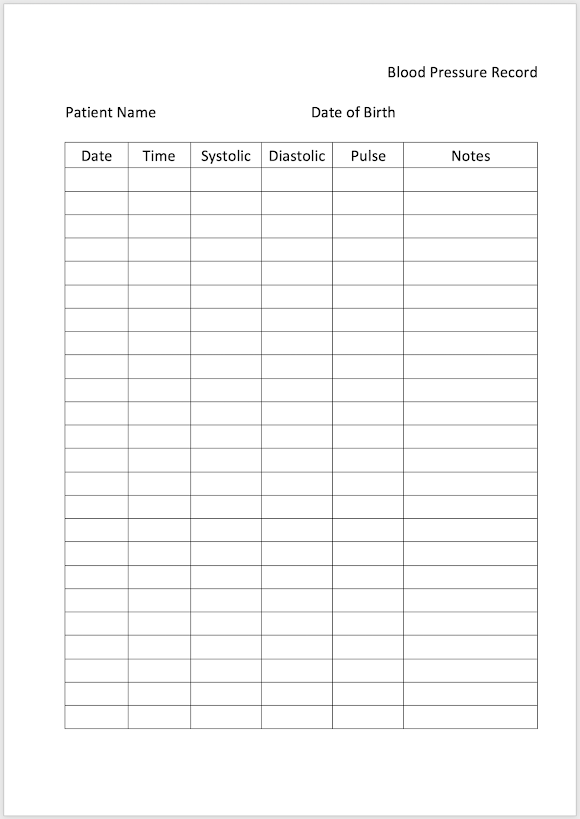
When did you last have your blood pressure checked? Do you 'know your numbers'? Having your blood pressure checked is quite a simple thing to do on a regular basis. 

If you don't have your own monitor to do the check your local pharmacy will have one or you can buy one, they aren't too expensive. 

High or low blood pressure gives rise to lots of other medical conditions. I'm no medical expert, but there are plenty of on-line help pages that explain the conditions and how your blood pressure can be controlled. 

However, this isn't by any stretch of the imagination an on-line medical blog! If you are doing regular blood pressure checks on the instruction of your doctor, then this insert will not doubt help you record the numbers, there a lot of them! 

Doctors vary, but mine asked me to do three measurements spaced by a few minutes twice a day, so three in the morning and three in the evening. 


I have created this insert in A5 size and Personal size, it might scale ok to A6 size as well depending on how neat your hand writing is. 
  • Blood Pressure Record - A5 size Word and PDF
  • Blood Pressure Record - Personal size Word


18 October 2021

New Templates

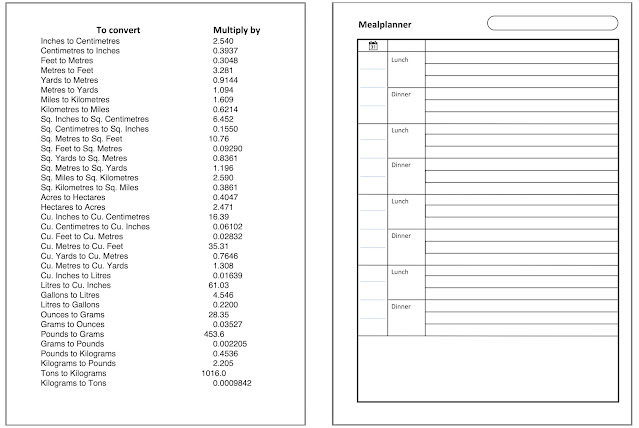
On our 'Files' page you will find a large collection of templates for pages you can download and print in various sizes. You can also modify some of them to your own requirements. 


Occasionally I will add some new ones as I discover something new I need myself. Today I'm sharing the following files for you to download and use. 

  • Meal Planner - .pdf - Only available in A5 size
  • Conversions - .doc .pdf Personal size
  • Conversions - .docx .pdf A5 size
Thank you to Markus for supplying the Meal Planner insert. 

If you have a template file that you have created that you would like to share with the community please send it to Steve at the usual address steve at philofaxy dot com.


22 July 2021

Shopping Lists

We live on lists of one sort or another, I'm sure plenty of others do as well. 

Today's shopping lists can live in your organiser or in your kitchen just as easily. 

The first one is designed for A5 size (A4 that can be scaled down to A5 or A6 or B6 as you wish) 

The order of the categories might look a little odd, but that is the order of the different sections in our local supermarket here in France. You can of course edit the file to suit your own needs fairly easily. 


The other list is a Filofax Personal size shopping list insert and the category order is a bit more conventional! But again you can change it is you want. 


Happy Shopping!

Creative Commons License
This work by Philofaxy is licensed under a Creative Commons Attribution-NonCommercial 3.0 Unported License. Please download, adapt, use, share, but don't charge or use commercially.

13 May 2021

Blank Pages Template

Prompted by Nan's FFAF (Free For All Friday) last week. I thought I would put together a template Word file for blank pages. 


You can download the file and add your own text easily or a map or anything and then print it out and you have your own page. 

Theoretically, it is possible to fit 3 personal pages in to an A4 sheet, but the left and right margins are quite thin, on some printers, the page will not print, hence I decided to leave it to just two pages per sheet!

Here are the files:

Ray created a template for printing on to Filofax Personal size paper here


25 April 2020

Reading Log

In our current situation (2020) I'm sure you are all doing more reading than normal. Well may be not,  but I am sure you might find this insert of some use anyway.

This was a design requested by @lavenderlovelifeuk one of our readers, I just created the insert for her.  Here is her description on how she will be using the insert.

Have you ever felt overwhelmed with article after article coming into your inbox from your University tutors? I did. So, I came up with a solution and designed the right Reading Log inserts to keep track of it all and my friend Steve turned my dream into a reality.
Here is how it works.
No. - Coloured. To track the order in which the article came in. If there is more than one article in the same email, all of them will have the same No. and colour. If more articles were received on the same day but in a second email, they will have a different No. and colour.Date - When the article was received.
Due - Date when it will be required, if there is one.
Title - Name of the article in the same colour of its No.
Pages - Total number of pages in the article.
Notes - To keep track of the last page I read.

And there I have it. Visibility.

The design has been created as Personal size on A4, so just print it out double sided and then cut out the pages to suit Personal size and punch. Remember to print at 100% and don't scale it.

You can download the template in .docx and .pdf

You can find other file templates in all sizes on our 'Files' page here on Philofaxy.

13 April 2020

DiY Planner Dynamic Templates

The DiY planner website has been around for ages. It is where I first started to share my Filofax Templates, before I knew about Philofaxy even! I last wrote about their Dynamic Templates back in 2014, so I thought it was time for an update.

They have had their Dynamic Templates for years too, these are generated by an application which will run on a Windows PC or a Mac.

The Windows application appears to run ok on Windows 10 (64 bit) so it should be ok on Windows 10 Home edition and earlier versions of Windows, although I only have one Windows 10 machine these days!

The beta Mac version will run on the latest version of OS X 10.15. and earlier Mac versions for Intel processors, such as OS X 10.13 High Sierra. The normal Mac version works ok on my older PowerMac hardware running OS X 10.4 Tiger.  To find out which version of OS you are using click on the Apple symbol in the top left of your screen, then 'About This Mac'

This is the main screen:


From this screen you can edit and select the following:
  • Type of page including, Calendars, note pages etc
  • For Calendars what day of the week you want to start on, and you can choose any of the 7 days in a week
  • The date of the first week, so you can try these out for different weeks as you wish. 
  • The date of the last week, to specify the range of dates
  • Time of the first appointment
  • 12 or 24 hour clock
  • Ruled or Unruled 
  • Layout and there are many to choose from including daily, weekly, monthly, yearly. 
In the Page Size tab you can alter and set:
  • Landscape or Portrait formats
  • Imperial or Metric measurement
  • Paper Type - European (ISO) or US sizes or Custom. Custom can be any size you want to create. 
  • Margins, essential for Filofax layouts to allow for the rings on the inside of the pages 
In the Line Spacing and Thickness tab you can set the line spacing on entries to a selection of different styles and adjust the line thickness used in the templates.

As you change any of the parameters though the results are shown on the screen as you can see above, so you don't have to print it out each time you make an adjustment.

The scale adjustment in the top left hand corner allows you to tailor it to fit your own screen.

To output the final result you can save the template as a pdf file, then you just print your pdf file in the normal way. However take care that your pdf doesn't get rescaled, always print it at 100% other wise your margins will be different.

These pages are great for trying out ideas, or may be just to try a different page size format before you commit to using it full time.

To try this software out for yourself, go to the page on DiY planner

27 February 2020

Dot Grid Pages

We had a recent request for some 'Dot Grid' templates for your Filofax. I found a few examples on line, but I decided to create my own anyway.


I've created three different sizes of grid: 5mm, 7mm and 9mm, you can download them here:
  • A4/A5 - 5mm Dot Grid Pages - .docx .pdf
  • A4/A5 - 7mm Dot Grid Pages - .docx .pdf
  • A4/A5 - 9mm Dot Grid Pages - .docx .pdf
Each file contains four pages so if you booklet print you will get two A5 pages with each side filled with the dot-grid pattern. 

These were fairly easy to create. Each page is just a table, with invisible borders with a central full stop in each cell. I sized the table cells accordingly and allowed for the scaling down when printing from A4 to A5 

If you show the grid lines in the table, the page looks like this:


Therefore creating other page sizes or dot intervals is fairly easy to do. 

I hope you find these templates useful in your organiser/planner. 

21 March 2019

Reading Lists

Books, I love to read them, but can I remember which ones I've read, and if I'm reading a series have I read them in the correct order?

If you know me well enough then the answer is no... to both questions! Poor memory or just too much going on in life you decide!

This is where my organiser comes to the rescue!  I have some simple templates that I can write in the book titles I've read so far. In the case of a series I write them in to the list in the correct order and then I can enter the dates I read them or simply tick them off as I go through them.

You can find the templates I use here:
Alternatively I've adapted an existing 'To-do' list into a reading list or books to read list. Will there be enough time to read them all is another matter!

You will of course find my dear wife's books here! I'm sure she will welcome a few more fans! 

Happy reading.... 

21 February 2019

Undated A5 Diary Insert Pages

As well as the dated versions of the diary layouts we have on Philofaxy. We also have undated versions of the same layouts.

You can print these off as and when you need a week or a day to plan a specific event. Or if you just want to try out these new layouts without printing off a whole load of pages.

Enhanced TM Week View (Undated)


Download Word file or PDF file

Vertical Week View


Download Word file or PDF file 

2 Days Per Page Lined and Unlined


Download Word file (Lined) or PDF file   or Word file (Unlined) or PDF file

Day Per Page


Download the Word File or PDF file 

Day on Two Pages


Download the Word File or PDF file

All of these files will print on to A5 paper or A4 paper using booklet print mode of your printer.


Creative Commons License
This work by Philofaxy is licensed under a Creative Commons Attribution-NonCommercial 3.0 Unported License. Please download, adapt, use, share, but don't charge or use commercially.

08 August 2012

Guest Post - Helen - Rotary Cutting for Filofaxers

Thank you to Helen for doing a Guest Post/Video of how she has been using her 'Ray and Steve' diary inserts and how she cuts them after printing them. Watch carefully. 


Here are some stockists of the equipment shown in the video:
I have no affiliation with these stores and many other stockists are available. Google searches for rotary cutter, quilting ruler and cutting mat will find them

Helen.

Thank you Helen for a great video, I was certainly not aware that type of cutter existed.  

09 July 2012

New Filofax Personal layout - Landscape week on two pages

This one began as a request from a Philofaxy reader who asked for a version of the Filofax Week-To-View Horizontal layout that was not quite so discourteous to weekends:


The obvious enhancement here would be to put four days across the page rather than three, but we worried that then the columns would be too narrow. Our reader agreed, and came up with what Ray and I thought was a fantastic idea. See if you agree:


Weekend days are afforded as much respect as those in the working week, while each week's layout ends with a 'Notes / Next Week' space.

You can download this layout as a prepared set or you can download the source files to adapt the design for yourself.


Pre-prepared sets

You can download and print finished versions for this year from our diary inserts page.

Print this double-sided. If you have a duplex printer, set it to flip on the short edge. If you don't then you'll have to print odd-numbered pages and then refeed to print the even-numbered pages on the reverse. You might have to experiment to find out how to refeed the paper.

On one side of each sheet you'll find crop marks. Use a craft knife and a steel ruler to release the Personal pages and punch them. The templates are set up with mirrored gutters to accommodate the holes.

If using the PDF be sure to set it to print at full size as explained here.

Source files

You can also roll your own using our source files. You'll need this Word file and this Excel file.

If you want to know how to go about using the source files, this post will help you.


24 June 2012

Filofax Pocket Size Week Per View to download

Ray recently posted a new layout in Personal size that was inspired by Filofax's Cotton Cream Week-on-two-pages.  He is now releasing a version in Pocket size.

Weekend days are afforded as much respect as those in the working week, while each week's layout begins with a 'This Week' space for notes and all-week items (for tracking habits perhaps?)

You can download this layout as a prepared set or you can download the source files to adapt the design for yourself.


Pre-prepared sets

You can download and print finished versions for this year from our diary inserts page.

Print this double-sided. If you have a duplex printer, set it to flip on the short edge. If you don't then you'll have to print odd-numbered pages and then refeed to print the even-numbered pages on the reverse. You might have to experiment to find out how to refeed the paper.

On one side of each sheet you'll find crop marks. Use a craft knife and a steel ruler to release the Pocket pages and punch them. The templates are set up with mirrored gutters to accommodate the holes.

If using the PDF be sure to set it to print at full size as explained here.

Source files

You can also roll your own using our source files. You'll need this Word file and this Excel file.

If you want to know how to go about using the source files, this post will help you.

17 June 2012

Diary Insert to print and use - A4/A5 Week per Page

This one is based on a Philofaxy reader request which I created fairly quickly from one of our existing templates.


You can download this layout as a prepared set or you can download the source files to adapt the design for yourself.

You can download finished versions for this year from our diary inserts page
Print this double-sided. If you have a duplex printer, set it to flip on the short edge. If you don't then you'll have to print odd-numbered pages and then re-feed to print the even-numbered pages on the reverse. You might have to experiment to find out how to re-feed the paper.

The templates are set up with mirrored gutters to accommodate the holes.

If using the PDF be sure to set it to print at full size as explained here.

Source files


You can also roll your own using our source files. You'll need this Word file and this Excel file.

If you want to know how to go about using the source files, this post will help you.

20 May 2012

Week-on-Two-Pages Personal Filofax diary to download

When Ray recently lost his Filofax (gasp!) he had to buy a new one, which came with the standard Filofax week-on-two-pages diary. For the sake of convenience, Ray just started using it, but before long he began to experience a few frustrations with the layout:
  • Saturday and Sunday are squashed together into the same space afforded to any one of the other days
  • Nearly half the space left to Sunday is lost to the monthly calendar
  • There's no room for week-long events like half term
On the other hand, the format allows about the right amount of space for most days and Ray liked seeing the whole week in one view.

Ray did some research and found Filofax's Cotton Cream Week-on-two-pages, which looked absolutely ideal. But then he didn't want a Cotton Cream insert in a predominantly white set-up.

The solution seemed obvious: to build something similar to the Cotton Cream layout that we could print on our own paper. Since Ray was taking inspiration from the Cotton Cream insert, he thought it would be fun to replicate another aspect of the design, namely the lower-case month and day names that give the layout such a distinctive and simple feel.

It turns out that a simple switch in the mail merge codes can force lower-case formats, so job done.

Here's the final layout:

Weekend days are afforded as much respect as those in the working week, while each week's layout begins with a 'This Week' space for notes and all-week items (for tracking habits perhaps?)

You can download this layout as a prepared set or you can download the source files to adapt the design for yourself.

Pre-prepared sets

You can download and print finished versions for this year from our diary inserts page.

Print these double-sided. If you have a duplex printer, set it to flip on the short edge. If you don't then you'll have to print odd-numbered pages and then refeed to print the even-numbered pages on the reverse. You might have to experiment to find out how to refeed the paper.

On one side of each sheet you'll find crop marks. Use a craft knife and a steel ruler to release the Personal pages and punch them. The templates are set up with mirrored gutters to accommodate the holes.

If using the PDF be sure to set it to print at full size as explained here.

Source files

You can also roll your own using our source files. You'll need this Word file and this Excel file.

If you want to know how to go about using the source files, this post will help you.

14 May 2012

A5 Week Per View Journal Diary Insert

Ray and I have had some great complements about the A5 Enhanced Time Management inserts that we have made available. I'm using one in my A5 and it's proving very successful.

Now I'm a 'two insert person' one for planning and one for my journal, present and future and the other for past. So I thought it would be appropriate to design a suitable journal insert to match the Enhanced Time Manager insert.

I've created a non-lined version


And a lined version


These are available in 2013 pre-prepared files available:
These are available in 2012 pre-prepared files available too:
 And if you like tinkering and customising our files here are the source files:
So now you can have a planner and a journal printed on good quality paper.

  Creative Commons License
This work by Philofaxy is licensed under a Creative Commons Attribution-NonCommercial 3.0 Unported License. Please download, adapt, use, share, but don't charge or use commercially.

25 April 2012

Free Print Your Own Diary Inserts for 2013

[Update: For the latest versions of all of these files please visit our Diary Inserts Page]

Ray and I have had our gang of little people diary makers busy in the office these last few weeks assembling the full set of 2013 inserts for your pleasure.

In this post we will list all of the formats available, please refer back to the original articles for the details on each format and also to the source files if you fancy coming up with a format of your own, or just a variation on one we already have done. Anything is possible!

We will not be laying off the little people just yet.... they will have a rest during the summer and we will put them back to work again in the New Year to get them to produce the 2014 inserts.... if there is the demand of course... we have no idea how many of you are using them.

Anyway if you have any suggestions for improvements or comments about how you are using these inserts we would love to hear from you and we will pass on the comments to the little people.

A4/A5 Format inserts for 2013
Personal on Personal Paper
Personal on A4 Paper
Pocket on A4 Paper
Please report any broken links to philofaxy at gmail dot com

Creative Commons License
This work by Philofaxy is licensed under a Creative Commons Attribution-NonCommercial 3.0 Unported License. Please download, adapt, use, share, but don't charge or use commercially.

25 March 2012

Free Pocket Filofax diary layouts to download

People have been very patient. Ray and I are now ready to release Pocket-sized versions of some of our diary layouts.

1. Enhanced TM Week on Two Pages
First, we have the very popular Enhanced TM Week on Two Pages layout:


Is the Pocket page big enough for this layout to be usable? You'll have to decide. But with this layout, you can view the whole week's schedule alongside daily tasks. And, weekend days get as much space as weekdays, which I know lots of people are clamouring for.

You can download and print finished versions for this year from our diary inserts page.

Print this double-sided. If you have a duplex printer, set it to flip on the short edge. If you don't then you'll have to print odd-numbered pages and then refeed to print the even-numbered pages on the reverse. You might have to experiment to find out how to refeed the paper.

On one side of each sheet you'll find crop marks. Use a craft knife and a steel ruler to release the Pocket pages and punch them. The templates are set up with mirrored gutters to accommodate the holes.

As usual, we're also giving you the facility to lift the bonnet and play with the innards. You'll have full freedom to edit and create your own adapted version by downloading this Word file and this Excel file.

If you want to know how to go about using the source files, this post will help you.

2. Two Days Per Page
Next we have the Two Days Per Page layout, in two flavours: unlined and lined:


You can download and print finished versions for this year from our diary inserts page.  Use the instructions above to print and finish your pages.

Before printing any of the prepared sets, please see our note on printing PDF files on this page

All you tinkerers need to download this Word file for the unlined version or this Word file for the lined version. In either case, you'll also need this Excel file.

Creative Commons License
This work by Philofaxy is licensed under a Creative Commons Attribution-NonCommercial 3.0 Unported License. Please download, adapt, use, share, but don't charge or use commercially.

19 March 2012

Free Day-Per-Page and Day-On-Two-Pages diary pages for the Filofax Personal

Before Ray and I began our project to design a full range of diary pages, Ray created a couple of A5 layouts for Day-On-Two-Pages and Day-Per-Page diaries and it's these - adapted for the Filofax Personal - that we are releasing today.

First up is the Day-On-Two-Pages:


Then we also have Day-Per-Page:


1. Pre-prepared 2012 sets

You can download and print finished versions for this year from our diary inserts page.

Print these double-sided. If you have a duplex printer, set it to flip on the short edge. If you don't then you'll have to print odd-numbered pages and then re-feed to print the even-numbered pages on the reverse. You might have to experiment to find out how to re-feed the paper.

On one side of each sheet you'll find crop marks. Use a craft knife and a steel ruler to release the Personal pages and punch them. The templates are set up with mirrored gutters to accommodate the holes.

Source files

You can also roll your own using our source files. The Day-On-Two-Pages version uses this Word file as the base document and this Excel file as the data source. The Day-Per-page version uses this Word file as the base document and this Excel file as the data source.

You can also try out this same format on personal size paper too, although it is a lot of paper! If you want to use the source files you will need both the Word file and the Excel File

If you want to know how to go about using the source files, this post will help you.

Creative Commons License

This work by Philofaxy is licensed under a Creative Commons Attribution-NonCommercial 3.0 Unported License. Please download, adapt, use, share, but don't charge or use commercially.